In this example, We will create an UI5 application and consume the destination api using fetch.
We will be following below steps-
- 1. Destination configuration for required service.
- 2. Configure the Destination on xs-app in UI.
- 3. Configure UI and Controller file to consume the oData Service.
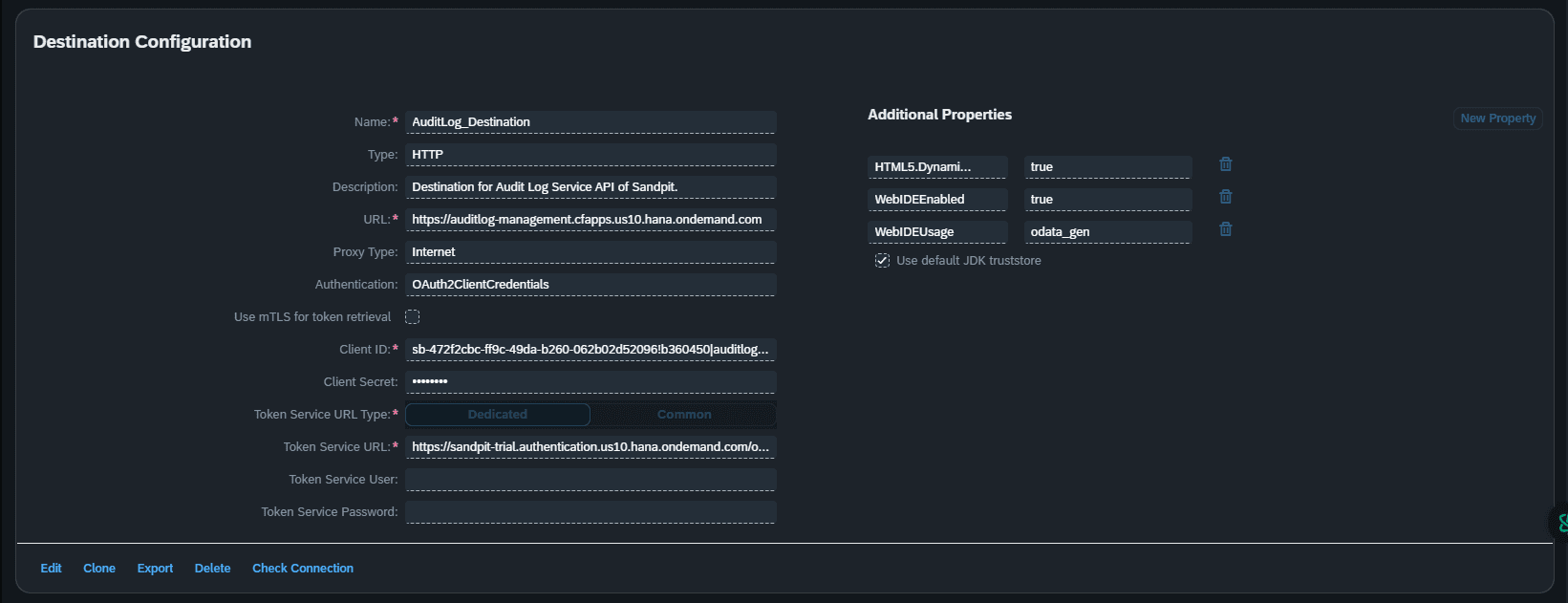
Step 1 - Destination configuration for required service
Create a Destination on BTP Cockpit Subaccount where you will deploy your Fiori UI5 Application.
Do not forget to add Additional Properties -
HTML5.DynamicDestination - true
WebIDEEnabled - true
WebIDEUsage - odata_gen
Step 2 - Configure the Destination on xs-app in UI
Create a UI5 App and on the xs-app.json file add the Destination configuration refering the below code -
source and destination - destination configured on the Subaccount.
So your xs-app.json file will look something like below -
Step 3 - Configure UI and Controller file to consume the oData Service
In the View.xml file, create a button clicking on which will get the data using Destination.
Now, in the Controller.js file of the view, add the below methods to get data from Destination.
And it is done !!!